Claude Code usage limits, explained and tracked live.
Claude doesn't cut you off at random: your plan comes with a 5-hour session and a weekly limit. Here's how they work, where to check them, and how to stop hitting them by surprise.
The three limits to know
- The 5-hour session. It starts with your first message and lasts five hours. Everything you do with Claude during that time counts toward it. Once it's full, you wait for the reset.
- The weekly limit. A cap over seven days, on top of the session. It resets once a week, at a time specific to your account.
- The per-model limit. Depending on your plan, some models, Opus first among them, have their own weekly counter.
These percentages are calculated by Anthropic for your account. They depend on your plan (Pro, Max 5x, Max 20x or Team), the model you pick and how long your conversations run.
Where to check your limits
In Claude Code, the /usage command shows where your session and your week stand. On claude.ai and in the Claude app, the usage page in the settings gives the same numbers.
The catch: you have to remember to look. In the middle of work, nobody does, and the limit hits at the worst moment.
Track them live with WUMC
WUMC reads those same official percentages, using the Claude account already signed in to Claude Code on your Mac, and shows them where you're already looking: in the notch.
- An always-visible gauge that goes from green to red as your session fills up.
- The countdown to the reset of your session and your week.
- An alert at 50, 75, 90 and 100% of your limit.
- Charts of your limits over 24 hours, and over 7 days with WUMC Pro.
- With WUMC Pro, a forecast: at this pace, what time you'll hit your limit.
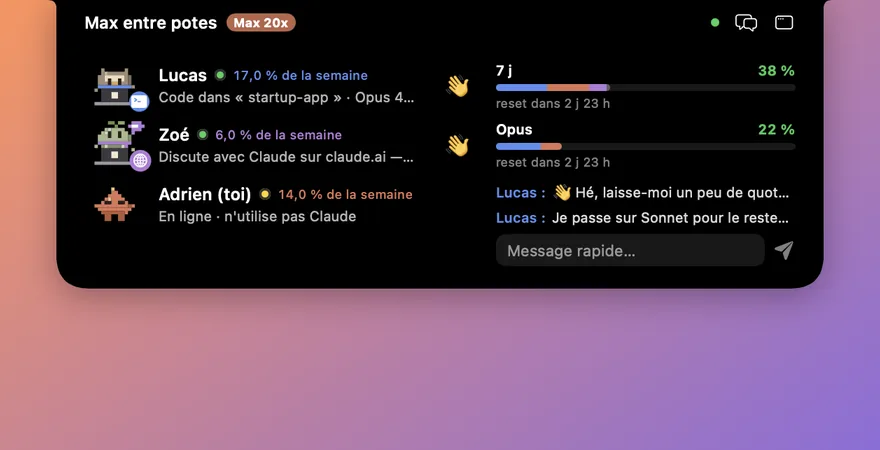
And your team's limits
In a WUMC team, each member connects their own Claude account. You see where everyone stands, and you're told when a teammate is blocked until their reset: handy for knowing who to hand the next task to.
WUMC shares no account and bypasses no limit: it makes them visible.
Frequently asked questions
When does my 5-hour session reset?
Five hours after the first message of the session. WUMC shows the time left in the notch, and your mascot throws a party at the reset.
Does usage on my phone or on claude.ai count too?
Yes. Claude Code, the Claude app, claude.ai and your phone all draw on the same limits of your account.
Can WUMC raise or bypass my limits?
No. WUMC reads and displays your account's limits. It doesn't change them, and it doesn't let anyone use someone else's account.
Does WUMC read my conversations with Claude?
No. To measure your activity, WUMC only reads the token counters and the model name in the Claude Code logs. Message content is never decoded, and none of it leaves your Mac except per-minute totals.